YouTube remains the second-largest search engine globally, processing more searches than Yahoo, Bing, and AOL combined (Source: DataReportal 2025/2026 Digital Trends), and that alone makes it impossible to ignore for event marketing. When used correctly, YouTube gives your event long-term visibility, reach, and a direct path from discovery to ticket purchase.
That said, simply uploading videos isn’t enough. Creating content is just the first step; if your videos aren’t optimized enough, they won’t get discovered, and they will get buried under thousands of competing videos.
In this guide, we will tell you how to promote events on YouTube in 2026, including modern YouTube event promo ideas, step-by-step YouTube event marketing, and practical YouTube SEO techniques that actually help your event get noticed. With YouTube now driven by AI-powered recommendations, Shorts, live streaming, paid ads, and even podcasts, event promotion on the platform looks significantly different from what it did a few years ago. This blog breaks it down clearly.
Why YouTube Matters for Event Promotion
Unlike social media posts that disappear within hours or days, YouTube videos, especially Shorts, can continue driving traffic for weeks or even months after they’re published. That’s because YouTube serves content based on search intent and viewing behavior, not just recency.
Another major advantage is audience diversity. YouTube reaches every age group, from Gen Z to older adults, making it one of the few platforms that works equally well for concerts, festivals, conferences, comedy shows, and niche events.
YouTube also supports:
- Long-form videos (trailers, interviews, behind-the-scenes)
- Short-form content (Shorts for discovery)
- Live streaming (Q&A sessions, announcements)
- Community posts (polls, reminders, engagement)
In short, YouTube combines everything most social media platforms offer, plus long-form storytelling that helps you build a real connection with viewers. And importantly, it allows you to promote an event on YouTube without a budget, using organic discovery if your content is optimized well.
YouTube works best when it’s part of a larger event video marketing strategy. If you’re planning promotions across multiple channels, you may also find this helpful: The Complete Guide to Event Marketing for 2025
YouTube Event Promo Ideas 2026
Here are some YouTube event promo ideas that work in 2026, based on how people actually discover and engage with event content today:
- Community posts to spark curiosity, ask followers to guess the artist, speaker, or lineup in the comments
- Shorts announcing the event, paired with long-form behind-the-scenes videos showing rehearsals or preparation
- Live Q&A sessions to answer ticket buyers’ questions in real time
- Influencer collaborations and ticket giveaways to expand reach beyond your existing audience
- Podcast-style interviews with artists or speakers to build anticipation and story
- YouTube ads to retarget viewers who’ve already engaged with your videos
A strong strategy mixes organic discovery with selective paid promotion, depending on your budget and goals.
 Pro Tip for Presenters
Before You Promote, Get the Basics Right
Don't waste your ad spend on a high-friction checkout. Ensure your event page is built on a foundation that actually converts.
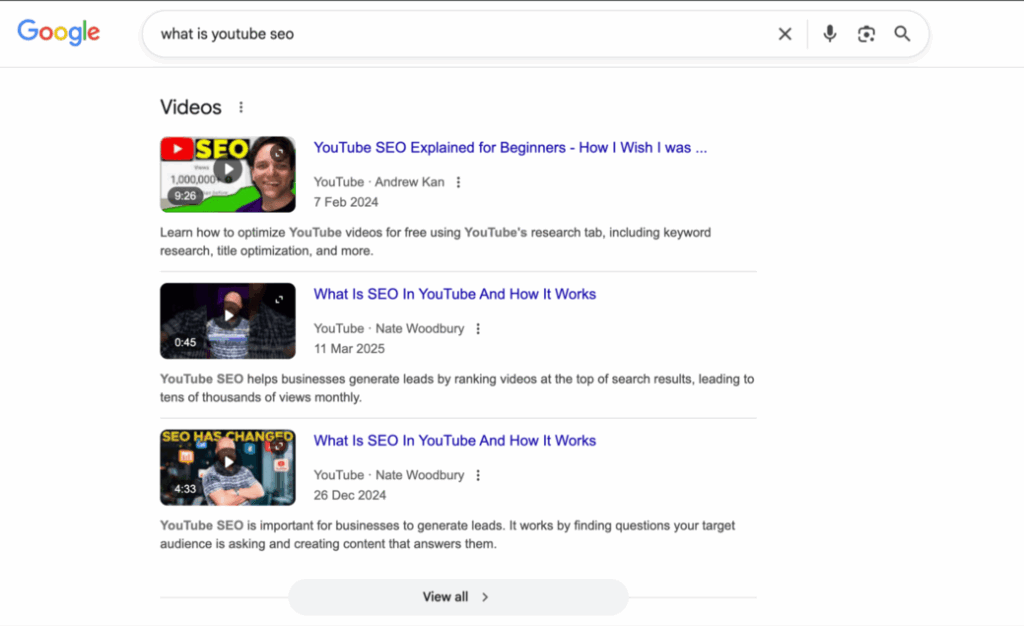
What is YouTube SEO and why is it important?
YouTube SEO (Search Engine Optimization) means optimizing YouTube videos so they can rank higher in the search results and get recommended more frequently.
At its core, YouTube SEO for events involves:
- Identifying the terms people are actually searching for
- Using those keywords naturally in titles, descriptions, and tags
- Structuring videos to keep viewers watching longer
- Sending strong engagement signals to YouTube’s algorithm
Just like Google SEO, the goal is simple: when someone searches for an event, artist, venue, or “things to do” in their city, your video should appear first.
Step-by-Step YouTube SEO for Events
The foundation of YouTube SEO for successful event video optimization is keyword research. This helps you understand how people search for events and what language they use when they’re ready to attend.
Instead of guessing, you’re aligning your content with real demand, which dramatically improves visibility.
YouTube Channel Setup for Events
Before uploading videos, make sure your channel is event-ready.
This includes:
- A clear channel name, profile picture, and banner that reflect your brand or venue
- An optimized channel description section with keywords and location
- Create playlists for upcoming events, past highlights, or artist features
- Maybe a channel trailer explaining what type of events viewers can expect
A well-structured channel builds trust and helps YouTube understand who your content is for.
Event Keyword Research
To find what people are searching for, you can use the free tools below:
- YouTube’s autocomplete suggestions
- Google Search suggestions or Google Trends12
- Tools like AnswerThePublic or SEMrush
Choose one primary keyword and 2–3 secondary keywords per video. For events, the primary keyword is usually:
- The artist or performer’s name
- The venue name
- The city, state, country + event type
Example:
An event is happening at Soboba Casino Resort in San Jacinto, California, featuring Los Lonely Boys.
Possible keywords:
- Los Lonely Boys
- Soboba Casino Resort concert
- Things to do in San Jacinto
- Music concert in California
- Events in California
- Soboba Casino concert
Next, evaluate search volume and relevance. Prioritize keywords that people in the event’s location are actively searching for.
In this case, the primary keyword could be Los Lonely Boys, followed by Soboba Casino Resort and city-based keywords.
Add Primary Keyword to Event Video File Name
Avoid random file names like video.mov as they add no SEO value.Before uploading, make sure you rename your video file using your main keyword. File names are crawlable and help reinforce relevance.
Example:
los-lonely-boys-live-at-soboba-casino-resort-1-may-2026.mov
Optimize Event Video Titles & Descriptions With Keywords
The most important factors influencing the rankings of the videos are the Titles and descriptions.
Title best practices:
- Place the primary keyword at the beginning
- Keep titles between 55–60 characters [ideal limit: 100 characters] so that they are fully shown on the SERP
- Mention the event venue and date as well
Example:
Los Lonely Boys Live at Soboba Casino Resort | May 1, 2026
Description best practices:
- First 2 lines should include the ticket link and key details [ideal limit: 5000 characters]
- Mention city, date, and event type early
- Add secondary keywords naturally
- Use hashtags [reuse primary and secondary keywords]
- Include a clear call-to-action
Avoid keyword stuffing; over-optimization can hurt visibility.
Example:
Lorem ipsum dolor sit amet, consectetur adipiscing elit. Ut elit tellus, luctus nec ullamcorper mattis, pulvinar dapibus leo.
Los Lonely Boys are coming to Soboba Casino Resort for an unforgettable live concert on May 1, 2026, in San Jacinto, CA. Get ready for a high-energy night filled with their signature sound, classic hits, and an incredible live experience.
Get tickets: https://sobobacasino.yapsody.com/event/index/858317/los-lonely-boys?tag=e2300
What to expect at the show:
- Live performance by Los Lonely Boys
- Iconic tracks and fan favorites
- A full concert experience at Soboba Casino Resort
- Perfect night out for music lovers in Southern California
Whether you’re a longtime fan or discovering their music live for the first time, this is a concert you don’t want to miss.
Let us know in the comments: Which Los Lonely Boys song are you most excited to hear live?
Subscribe for event updates, artist announcements, and upcoming concerts.
#LosLonelyBoys #SobobaCasinoResort #LiveConcert #ThingsToDoInSanJacinto #CaliforniaEvents #MusicConcert #ThingsToDoInCalifornia
Here, use a tracking link on ticket links so you can measure conversions from YouTube. Here are tips on creating YouTube video descriptions.
Best YouTube Tags for Event Videos
YouTube tags still help with context, especially for new channels.
Use:
- Primary keyword
- Secondary keywords
- Artist, venue, and city names
Stay within the 500-character limit and avoid irrelevant tags. This improves discoverability without confusing the algorithm.
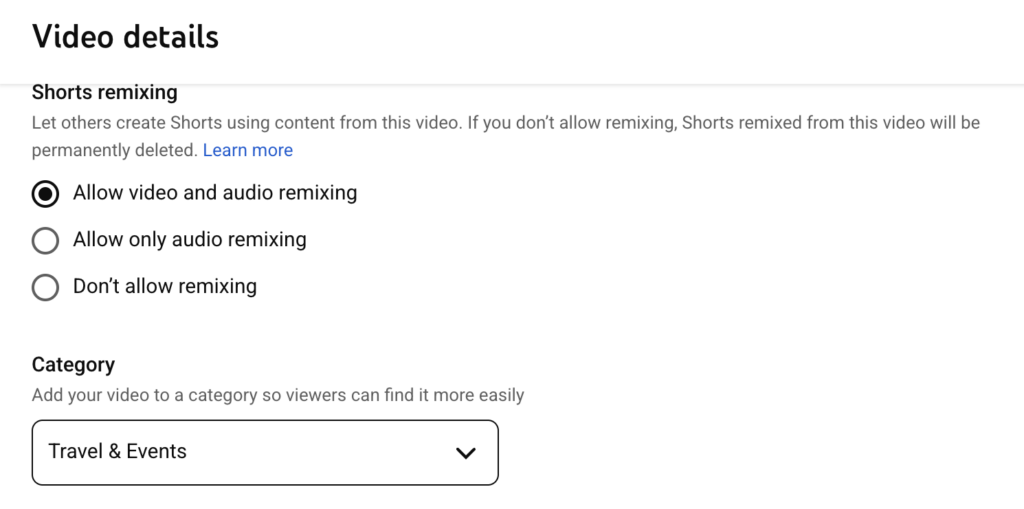
Add Video Category
YouTube offers multiple categories to choose from. Select the most relevant category, such as Travel & Events. While this doesn’t directly impact rankings, it helps YouTube surface your video to the right audience.
YouTube Event Video Thumbnail
The thumbnail is the first thing seen while searching for the video. Thus, they heavily influence click-through rate.
Best practices:
- High contrast visuals
- Minimal text (3–5 words max)
- Faces and emotions perform better
- Clear event branding
YouTube now allows limited A/B testing for thumbnails and titles, test up to three versions, and keep the best performer. Here are the thumbnail tips.
Other Important Settings
Don’t skip these:
- Add captions or subtitles
- Enable automatic chapters or add timestamps
- Allow embedding
- Invite collaborators (artist or venue channels)
- Add end screens and cards
- Pin a comment with the ticket link
These small optimizations collectively improve reach and engagement.
Engagement & Live Streaming Techniques
Live streaming builds trust faster than any other format because you can create a connection with the audience.
Before going live:
- Test lighting, sound, and internet
- Prepare a loose narrative
- Run a mock stream
During the live session:
- Host Q&A segments
- Use polls or quizzes
- Acknowledge comments by name
- Reiterate the ticket CTA naturally
When viewers feel seen, they’re more likely to convert.
Boost Visibility with YouTube Analytics
You don’t need to check analytics daily. Reviewing performance once or twice a week is enough.
Focus on these five metrics:
- Click-through rate (CTR): Improve thumbnails or titles if low
- Average view duration: Fix weak intros
- Traffic sources: Understand whether discovery comes from Search, Browse, or Shorts
- Top-performing videos: Embed event videos there
- Ticket link clicks: Measure real conversions
Analytics-driven tweaks compound over time.
Turn Views into Ticket Sales with Yapsody
All the visibility in the world means nothing if checkout friction kills conversions.
YouTube helps you create awareness, interest, and intent for your event, but ticket sales ultimately depend on what happens after a viewer decides to buy. That’s why choosing the right event ticketing software matters before you start promoting your event anywhere, whether on YouTube, social media platforms, email, or search.
Yapsody is built for event presenters who want a reliable, professional way to sell tickets online without worrying about technical complexity or poor user experience. Once your marketing drives traffic, your ticketing platform needs to do one job well: make buying tickets fast, simple, and trustworthy.
With Yapsody, event presenters can:
- Create event pages that reflect your brand identity
- Sell tickets online without redirect confusion or broken checkout flows
- Run promotions, discounts, and access-based ticketing with ease
- Track sales performance across campaigns, channels, and time with our robust reporting
- Scale from small events to high-volume shows without operational stress
In short, YouTube promotion brings people to the door, but the right ticketing system determines whether they actually walk in.
Book a demo to see how Yapsody helps event presenters set up a strong ticketing foundation before promoting their events at scale.
Frequently asked questions
How do I promote an event on YouTube effectively?
The most effective way to promote an event on YouTube is to combine optimized long-form videos, Shorts, live streams, and community posts. Start with a clear event announcement video/teaser to create curiosity, then support it with Shorts for discovery and Live sessions to answer questions. Optimize the YouTube video for SEO for events using the right titles, descriptions, and tags, for reaching people who are actively looking for events to attend.
How to promote an event on YouTube without a budget?
If you don’t have an ad budget, focus on organic YouTube event marketing. Use Shorts as short-form content gain quick and better visibility, collaborate with artists or venues to cross-post content, and stay active on community posts. Actively post polls and quizzes to keep the audience engaged, and also answer their queries. With proper YouTube event video optimization, it’s completely possible to promote an event on YouTube without a budget and still reach a highly relevant local audience.
What type of YouTube videos work best for event promotion?
All type of videos that feel authentic and informative tends to perform best.
These include:
- Event trailers that clearly explain what attendees can expect
- Artist or speaker interviews to build an emotional connection
- Behind-the-scenes videos that show preparation and rehearsals
- Countdown Shorts as the event date approaches
- Live Q&A sessions to address ticket buyers’ concerns
Usually, shorts tend to gain better and quicker visibility than any other form of content. But using a mix of formats helps capture attention at different stages, which helps in the decision-making process.
How can YouTube SEO help increase event attendance?
Yes, YouTube SEO indirectly helps in increasing event attendance. With YouTube SEO, your event shows up when people search for artists, venues, or things to do in their city. By optimizing titles, descriptions, and YouTube tags for event videos, your content reaches users with high intent, people who are already considering attending an event. This makes YouTube SEO one of the most cost-effective ways to increase event awareness and thus event attendance over time.
Should I use YouTube Live to promote my event?
Yes, YouTube Live is one of the strongest tools for event promotion. Live streams allow you to interact directly with potential ticket buyers, answer questions in real time, and create urgency as the event date approaches. Live sessions also build connection and trust, which makes viewers more comfortable clicking through when they’re ready to buy tickets.
Can I promote an event on YouTube without a large marketing budget?
Yes, many event presenters rely entirely on organic YouTube reach. With the right step-by-step YouTube event video marketing strategy and YouTube SEO for events, including Shorts, collaborations, consistent posting, and strong calls to action, you can drive meaningful visibility and ticket interest without spending on ads.
How can I track if ticket purchases are coming from my YouTube videos?
To track ticket purchases from YouTube, use unique links in your video descriptions, pinned comments, and live stream chats. These links help you see exactly which videos are driving clicks, and more importantly, completed ticket sales.
If you’re using Yapsody, this becomes much easier. Yapsody offers built-in Tracking Links, which will tell you exactly what is driving ticket sales. You can create a dedicated tracking link for each YouTube video, Short, or campaign and use it wherever you promote events.
With tracking links, you can:
- See how many tickets were sold and how much revenue came from each link
- Compare performance across YouTube, social media platforms, websites, or email campaigns
- View/Download reports to understand what’s actually driving conversions
This makes it easy to answer questions like “Which YouTube video sold the most tickets?” or “Are Shorts performing better than long-form videos?”, and optimize future promotions based on real data, not guesswork.